One hub to support and track every student
Grade all materials, schedule sessions, communicate with students, and automate your workflows, from a single dashboard. Customize your AI to match how your team works, and let automation handle the rest so advisors focus on high-impact conversations.
Trusted by career teams at

The Problem
Advisors are managing platforms instead of working with students
Your team juggles an LMS, a CRM, a scheduling tool, email, spreadsheets, and whatever else has been bolted on over the years. By the time advisors log into everything, half the day is gone. They're managing platforms, not supporting students. According to NACE, the median advisor-to-student ratio in higher education is 1:1,568 (Source: NACE 2025 Career Services Benchmark Survey). At that scale, manual tracking is impossible.
Students who need the most support go unnoticed because the data is scattered. Inactive job seekers don't get flagged. Follow-ups slip through the cracks. Meanwhile, advisors are buried in admin work before they ever talk to a student. You need one place where everything lives: grading, scheduling, communication, files, tasks, so your team can focus on the work that actually moves students forward.
How It Works
Unify your tools into one command center
Connect Your Systems
Bring in data from your SIS, Salesforce, LMS, and other platforms. Every student’s profile, activity, and history in one place — no more switching between tools.
Automate Your Workflows
Set up rules that trigger actions automatically: send reminders, assign tasks, nudge inactive students, and route the right student to the right advisor. Your playbook runs itself.
Focus on High-Impact Work
With admin handled and data centralized, advisors spend their time on the conversations that actually move students forward — grading materials, running sessions, and coaching.
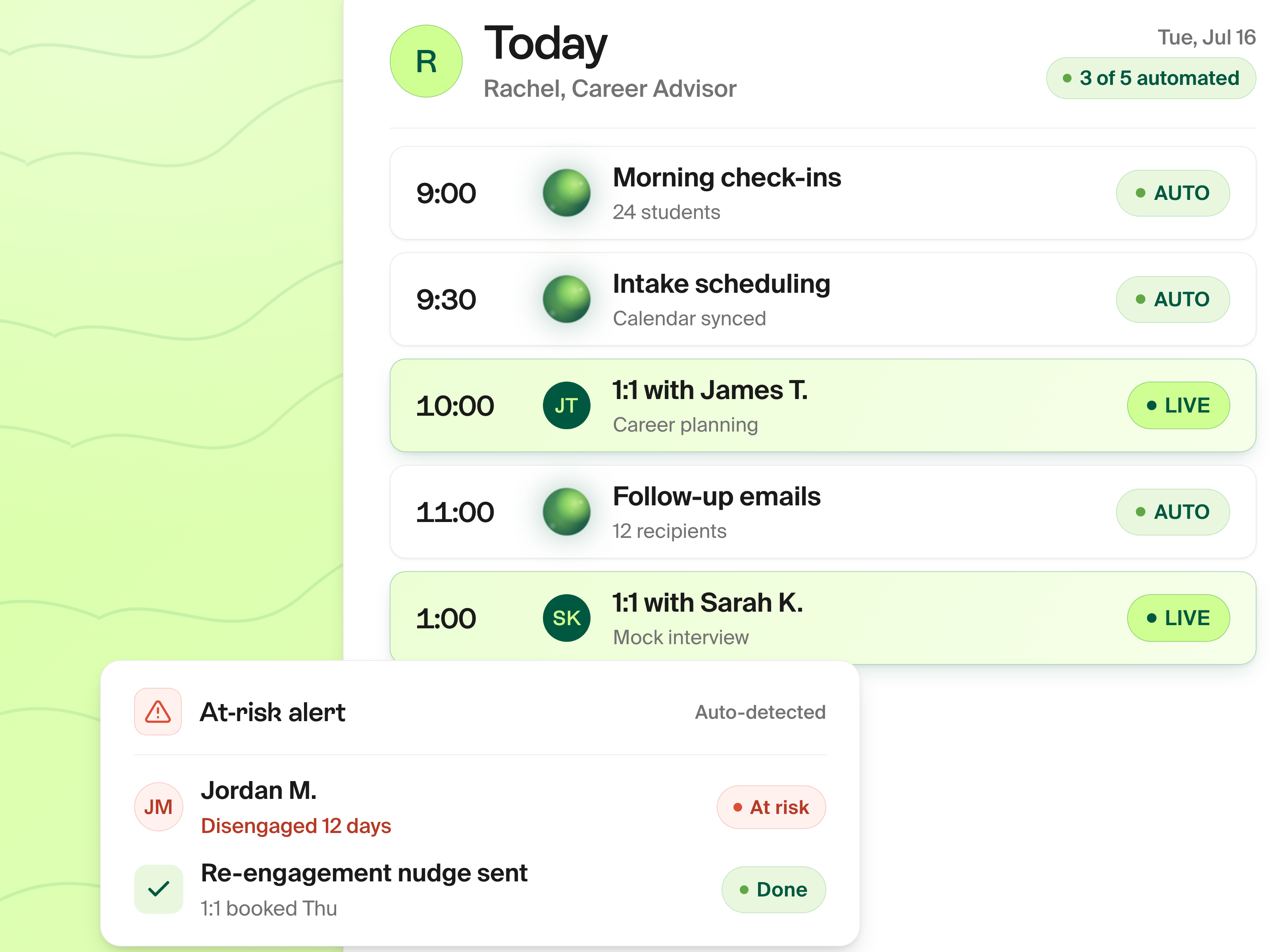
Centralized Dashboard
Full visibility into every student, every action
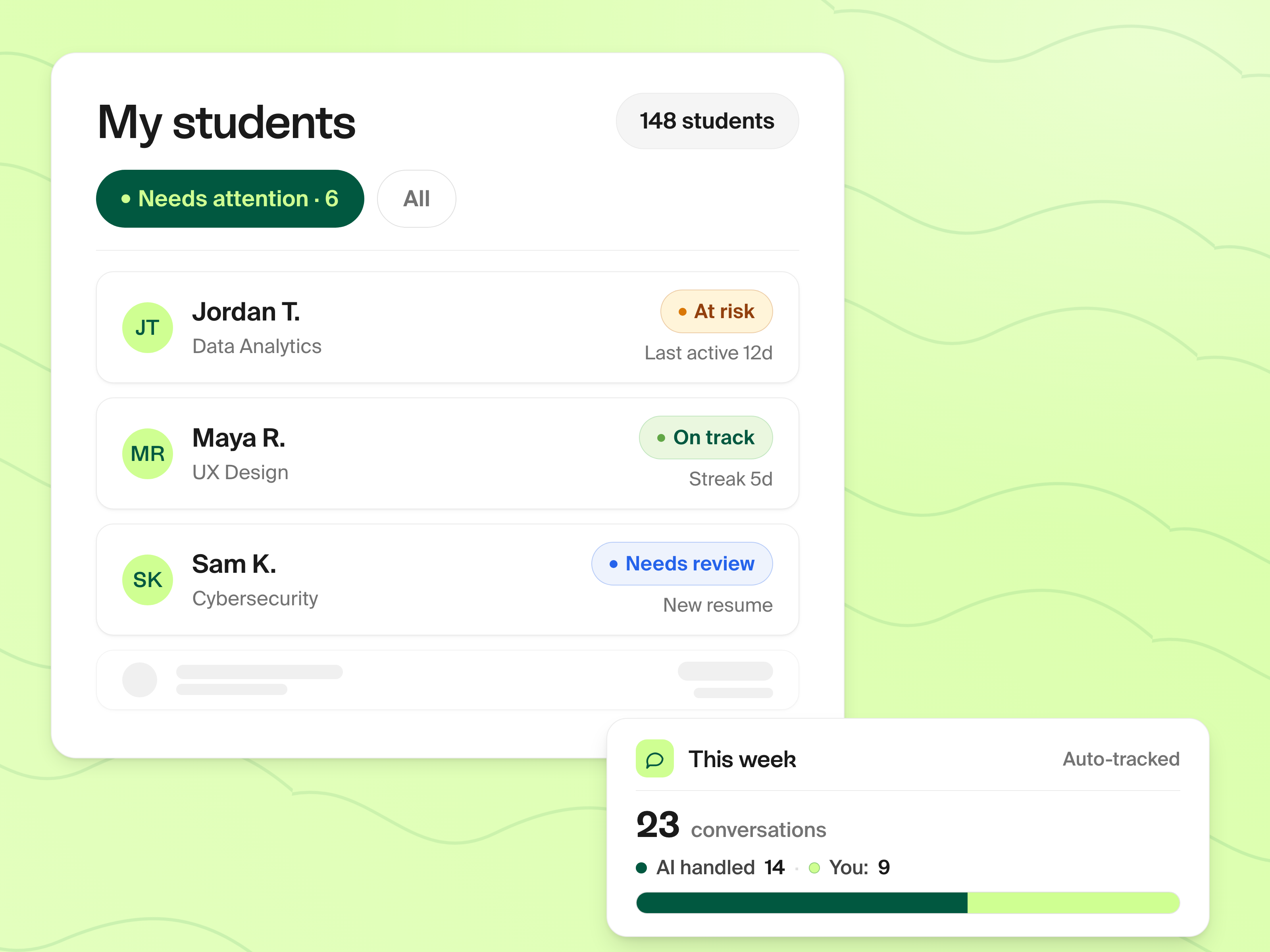
One dashboard shows every student's profile, files, activity timeline, and engagement metrics. Filter by program, cohort, status, or assigned advisor. See who's active, who's fallen off, and who needs intervention, before it's too late. Pairs with Outcome Tracking so you know who's been hired and who still needs help.
- Filter by program, cohort, tags, status, and assigned advisor
- Track every student action: applications, materials, sessions, engagement
- At-risk alerts surface students who need intervention now
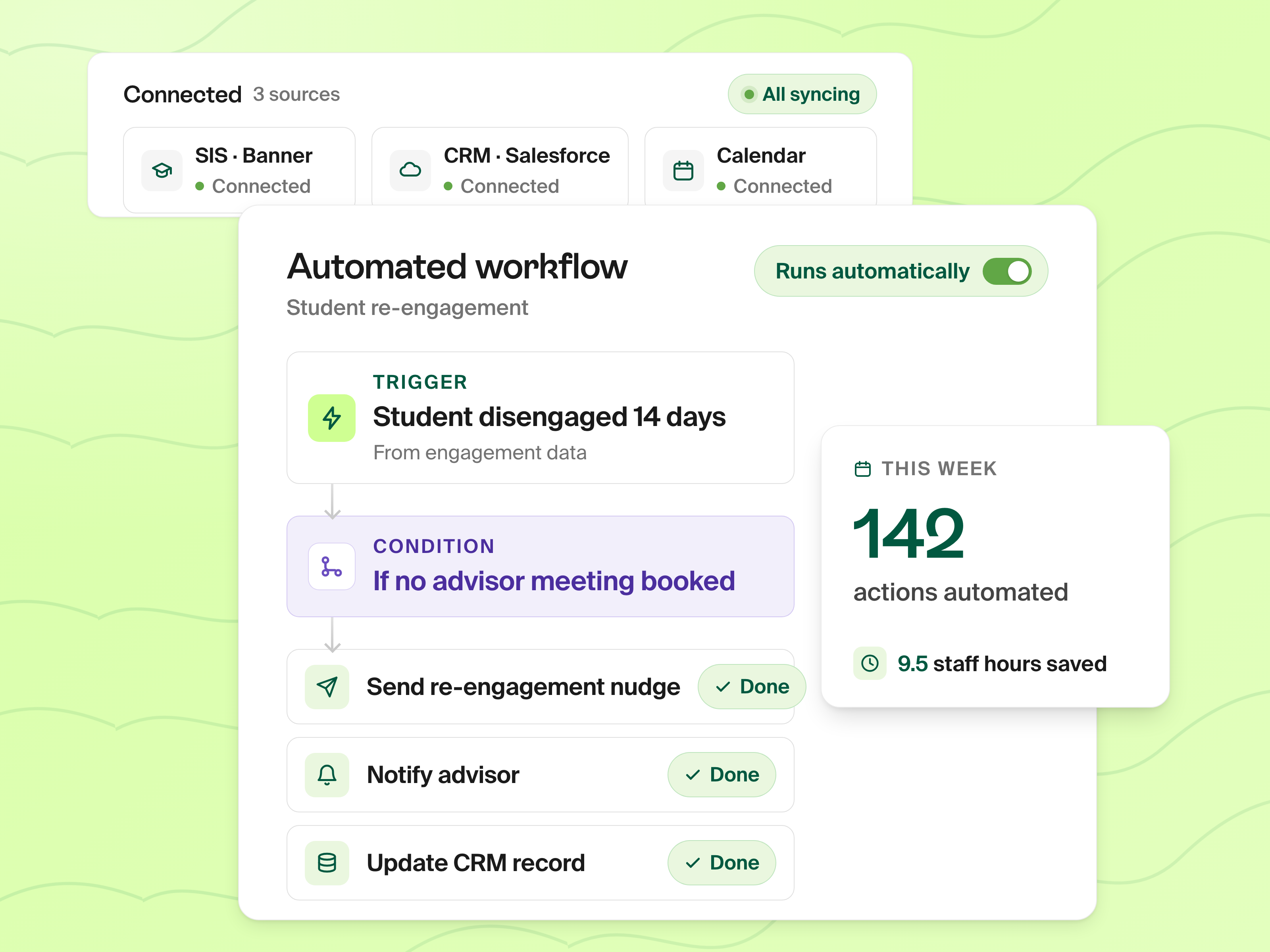
Workflow Automation
Your playbook runs itself so advisors don't have to
Create rules that trigger actions automatically. When a student goes inactive, the system sends a nudge. When a deadline is missed, the assigned advisor gets an alert. Inactive job seekers get automatically guided back on track, and if someone needs more hands-on support, you'll know about it before they disappear.
- Auto-nudge inactive job seekers and alert their advisors
- Assign tasks, update statuses, and route students automatically
- Bring in data from your SIS and Salesforce to trigger the right actions
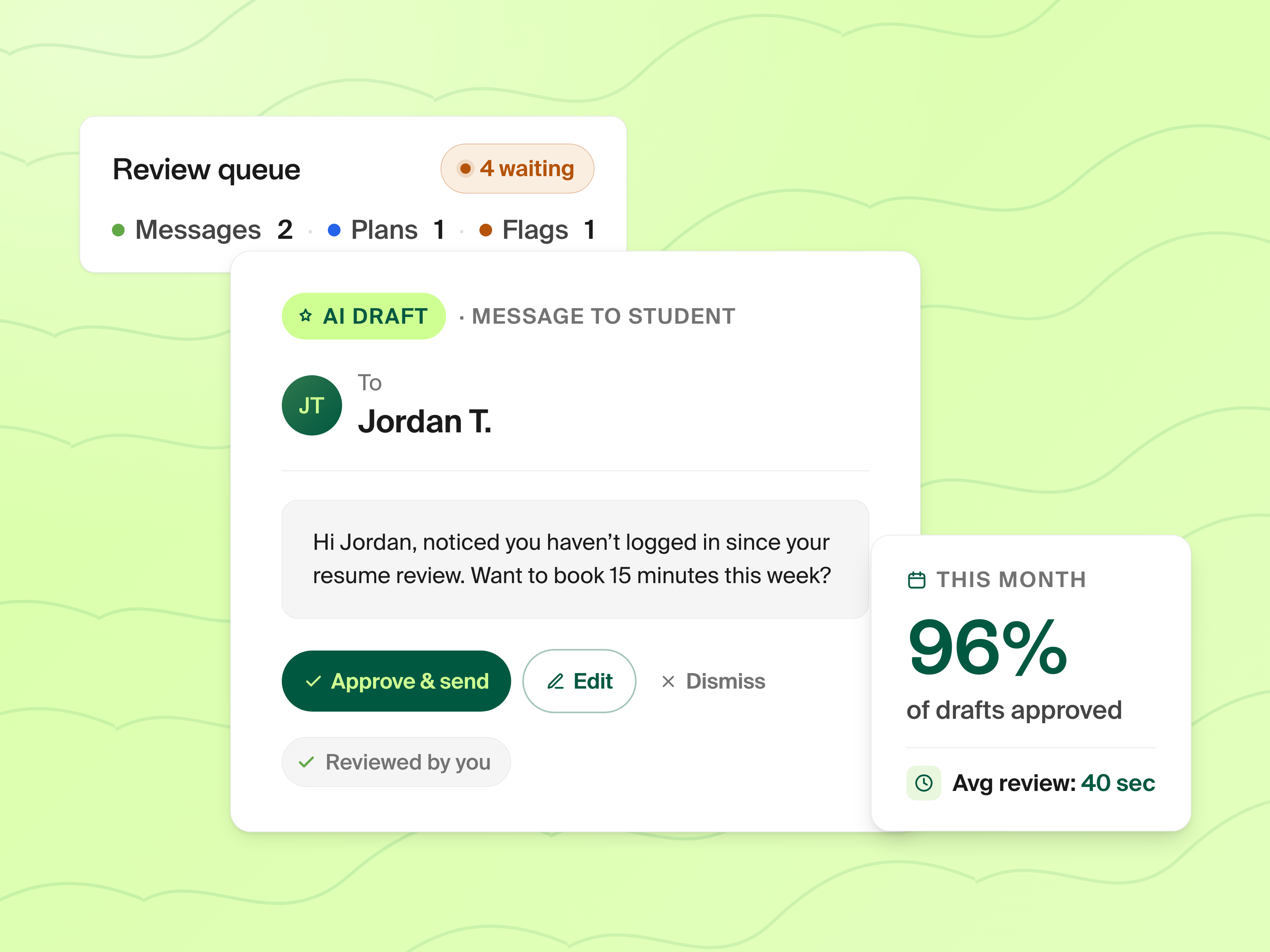
Grading & Review
Every submission in one queue, graded your way
Resumes, cover letters, LinkedIn profiles, tasks, support tickets, and mock interview recordings: everything students submit flows into a single, prioritized queue. Review, approve, or request revisions without email threads. Students get notified instantly when reviews are complete.
- One queue for resumes, cover letters, LinkedIn, tasks, tickets, and interviews
- Inline feedback with approve or revision request
- Queue auto-advances to the next submission after each review
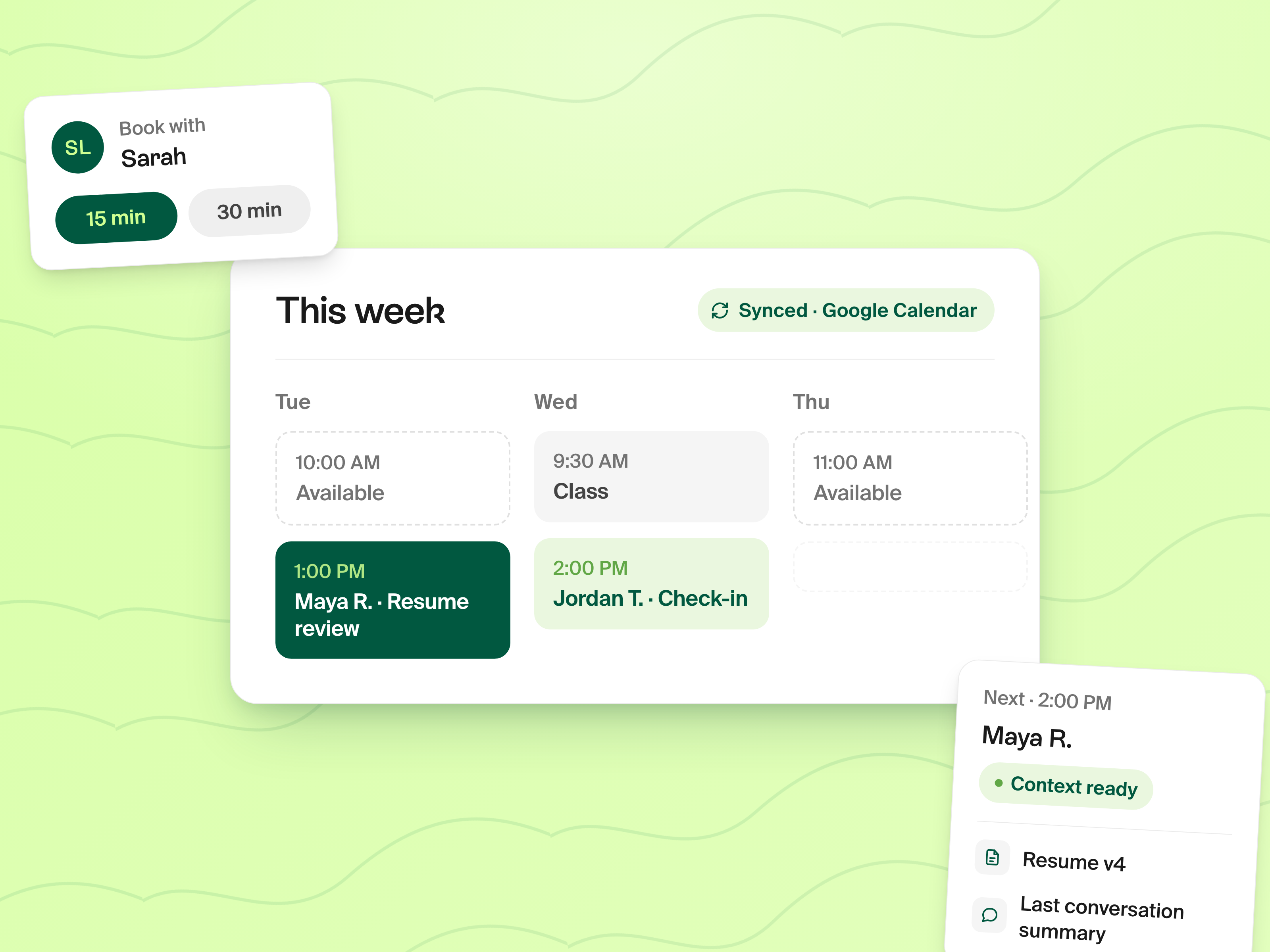
Session Scheduling
Replace Calendly with scheduling built into your workflow
Advisors set availability and students book time slots directly in Prentus: no separate tool needed. Set custom rules for who can book, add pre-meeting checklists so students come prepared, and create post-meeting to-dos that automatically become tasks. Add internal notes for your team and external notes to share with students alongside all other feedback.
- Google and Microsoft Calendar sync with automatic meeting links
- Group sessions so multiple students can book a single time slot
- Pre-meeting checklists, post-meeting to-dos, and internal team notes
Stop managing platforms. Start supporting students.
Book a DemoEverything else your team needs, built in
Central Communication
Built-in DMs and group messaging let advisors communicate with students in real time. Since Prentus has iOS and Android apps, students actually respond. All files, messages, and feedback in one place: no more chasing students across email and Slack.
Custom AI Rules
Every AI feature is customizable. Set custom rubrics for resume grading, custom rules for LinkedIn analysis, and custom guidelines for every material students submit. Your AI grades materials the way your team would, automatically and at scale. Part of the Job Search Tools suite.
Smart Alerts
Know who's been hired and who hasn't through Outcome Tracking integration. Inactive job seekers get automatic nudges to guide them back on track. If someone needs more hands-on support, their advisor gets an alert. You never have to wonder who to help next.
Templates for everyone or custom per advisor. Set up grading rubrics, scheduling rules, workflow triggers, and communication templates at the team level, or customize per advisor. Everything syncs automatically.
Scattered tools vs. one advisor hub
Without Prentus
- Advisors managing platforms instead of working with students
- Student data scattered across email, LMS, SIS, and spreadsheets
- Manual follow-ups that slip through the cracks
- No visibility into which students need help right now
- Hours spent on admin before any advising happens
With Prentus Advisor Suite
- One hub for grading, scheduling, messaging, and tracking
- Workflow automation handles follow-ups and nudges automatically
- Smart alerts surface inactive students before they drop off
- Custom AI rules grade materials the way your team would
- Advisors focus on high-impact conversations, not admin work
$617K saved annually at Fullstack Academy through 3x advisor efficiency. Advisors moved from scattered tools to one hub, cutting admin time and focusing on the students who needed them most.
Read Case StudyCommon questions about Advisor Suite
What can advisors grade through the Advisor Suite?
Advisors can review and grade resumes, cover letters, LinkedIn profiles, tasks, support tickets, and mock interview recordings — all from a single queue. Every AI feature uses custom rubrics your team sets, so grading is consistent across the board.
Does Advisor Suite replace Calendly for scheduling?
Yes. Advisors set availability and students book time slots directly in Prentus. It syncs with Google Calendar and Microsoft Outlook, supports group sessions, and includes pre-meeting checklists and post-meeting to-dos. No separate scheduling tool needed.
How does workflow automation work?
You create rules that trigger actions based on student activity or inactivity. For example, when a student goes inactive, the system automatically sends a nudge and alerts their assigned advisor. You can also auto-assign tasks, update statuses, and route students — no code required.
Does it integrate with our SIS and Salesforce?
Yes. Prentus integrates with your SIS, Salesforce, LMS, Google Calendar, Microsoft Calendar, and other platforms via webhooks and API. You can unify data from all your existing tools into one dashboard.
How does the messaging work?
Built-in DMs and group messaging let advisors communicate with students in real time. Since Prentus has iOS and Android apps, students actually respond. Advisors can also create group rooms for sessions and collaboration.
Give your advisors one place to do everything
Grading, scheduling, messaging, workflows, and student tracking, all in one hub. See how the Advisor Suite works for your team.